Activate Products in CycleSoftware
After entering the API key in StoreLinkr, you must activate the products you wish to sync. You can activate both bicycles (tweewielers) and general articles.
Activating Bicycles (Tweewielers)
To sync bicycles to your webshop:
- In CycleSoftware, go to Tweewielers -> Voorraad (zoeken).
- Search for the bicycles you want to activate.
- Click the magnifying glass icon next to a bicycle to view its details.
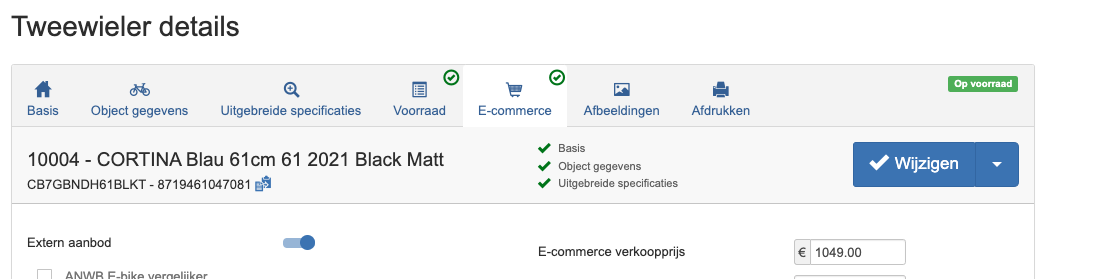
- Go to the E-Commerce tab.
- Enable the Extern aanbod (External offer) button to add the bicycle to the webshop sync.
Activating General Articles
To sync other articles (parts, accessories, etc.):
- In CycleSoftware, go to Artikelen -> Artikelen Catalogus.
- Search for the articles you want to activate.
- Click the blue 'i' icon to view the article details.
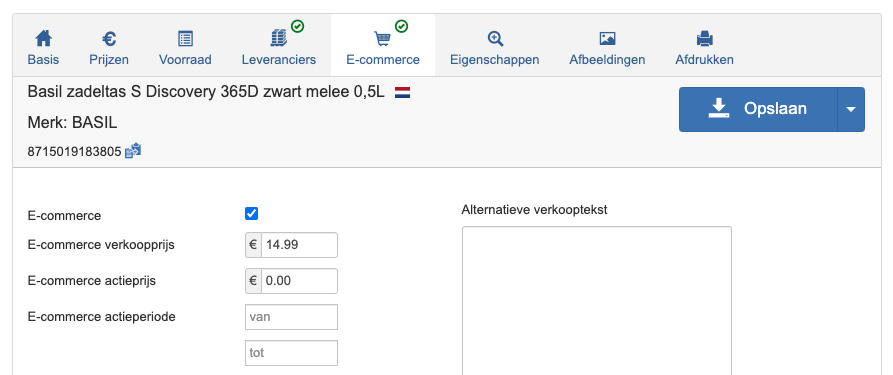
- Go to the E-Commerce tab.
- Check the E-Commerce checkbox.
- Tip: You can also set the retail price and promotional price for the webshop here.
Synchronization Process
Once activated, it may take several hours for products to appear in StoreLinkr. Data is fetched from CycleSoftware multiple times a day, processed, and then forwarded to your connected webshop.
Tutorial
Check out our Dropshipping Workflow (POS to Online Store) tutorial to see how to use CycleSoftware as an import source for your online shop.