How are product variants from Skwirrel transferred to WooCommerce?
There are many names for roughly the same thing: product variant, virtual products, grouped product. Here we mean independent products with their own EAN that can be purchased individually in a webshop. The common factor is that these products are related to each other.
For example, a specific brand and model of t-shirt. The same shirt is available in multiple colors and sizes. You want to be able to link these to each other in a webshop environment.
Skwirrel settings for variants
- Click on Catalog —> Products in the menu.
- Select two or more products using a bulk operation.
- Click at the bottom of the page on Edit selection —> Add to grouped product.
It is recommended to create a so-called "virtual product" above this relationship. We also read this product, and it is used to supplement the variant with more information about the article.
StoreLinkr import and variant management
To gain insight within StoreLinkr into how this is read:
- Go to your StoreLinkr portal.
- Check if we are allowed to use the correct attributes to base the variant options on. In the example of a t-shirt, this would be "Size" and "Color".
- You can activate these attributes globally from the variants overview in StoreLinkr. To do this, click on Catalog > Variants and use the Manage Options button.
For more information on managing unique variations and resolving uniqueness issues, see our main Variants documentation.
WooCommerce display
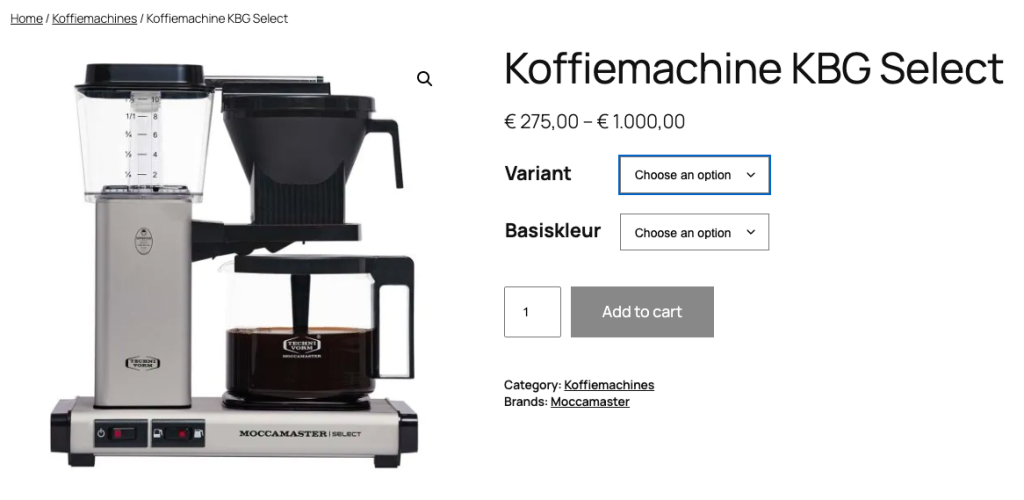
By default, we use variable products within WooCommerce. This means that one article is created, with all product options underneath it. The website user can easily switch between product options on the product page:
Alternative: Grouped Products
If you prefer to show variations as a list on a single page instead of a dropdown, you can enable the Grouped Product setting in your WordPress export task within the StoreLinkr portal. This is useful for B2B setups or parts catalogs.